
When a Cell Phone Bill Review Saved More Than Money

Technology consultant reviewing cellular phone bills and helping a customer set up a new smartphone.

Several months ago, a buddy of mine complained that his T-Mobile bill seemed too high.

I opened the T-Mobile app and reviewed his account. It didn’t take long to find a few opportunities for savings.

First, I noticed he was still paying for insurance on his Android phone even though the manufacturer’s warranty had already expired.

Next, I discovered he had a tablet plan on the account that he didn’t even remember having.

While he sat next to me, he called T-Mobile, and with his permission, I worked with the loyalty department to review his account. They moved him to the lowest available military plan, removed the unnecessary tablet line and device insurance, and reviewed his available discounts.

I also checked his T-Mobile Home Internet account. Because he bundled his mobile service and home Internet with automatic payments, several discounts were already being applied.

In the end, there wasn’t much additional money left to save because the bundle pricing was already competitive.

A New Phone for Free

While reviewing his account, I found another opportunity.

By trading in his old Android phone, he qualified for a newer Samsung Galaxy device through a promotion that provided monthly bill credits over 24 months, after sales taxes and activation fees.

We ordered the new phone online and visited a T-Mobile corporate store the following day to pick it up.

While we waited, I helped him back up his phone to Google.

When the sales representative handed us the new phone, we sat down and transferred all of the data from his old device. As a local technology consultant, I handled the setup and migration process while the sales representative focused on assisting other customers.

Afterward, we ordered a protective case and screen protector from Amazon and installed them once they arrived.

Understanding Wireless Plans

One of the services I have provided for decades is helping customers review cellular phone and Internet bills.

Many consumers assume they must stay with one of the major carriers. In reality, dozens of prepaid providers operate using the same networks owned by Verizon, T-Mobile, and AT&T.

The major carriers often allow these providers to use their networks, creating lower-cost alternatives for consumers.

As a result, many customers can reduce their monthly bill without sacrificing the coverage they already receive.

Do You Really Need Unlimited Data?

Many customers believe they need an unlimited data plan.

In reality, unlimited talk and text are standard on most plans. The real question is how much data you actually use each month.

Most carriers allow customers to review recent usage through their mobile app, online portal, or device settings. Customers are often surprised to discover that they use far less data than they thought.

A small percentage of users consistently consume large amounts of data and may benefit from a truly unlimited plan.

For everyone else, a lower-cost plan with the right amount of data and a small cushion may be the better choice.

Other Considerations

Choosing the right wireless provider isn’t only about price.

Customers should also consider:

  • Coverage where they live, work, and travel.
  • International roaming requirements.
  • Device compatibility.
  • Family plan needs.
  • Home Internet bundle discounts.

Sometimes the Cheapest Option Isn’t the Best Option

In my buddy’s case, there was very little additional savings available because his bundled services were already competitively priced.

That outcome can surprise customers.

Many people assume a lower bill always means switching providers. Sometimes the best solution is staying with the current provider, removing unnecessary services, applying available discounts, and making sure the customer is on the most appropriate plan.

The goal is not simply to find the cheapest service.

The goal is to find the service that provides the best value for the customer’s needs.

Technology Should Reduce Friction

At Win Information Technology, we help customers evaluate cell phone plans, Internet providers, and mobile devices based on their actual needs.

We assist with:

  • Wireless plan reviews
  • Carrier comparisons
  • Number transfers
  • New phone setup
  • Data migration
  • Internet and cellular provider negotiations
  • Device troubleshooting

We’ve even encountered situations where an adult child in another state is paying for a parent’s phone service but has no access to the physical device. The parent may not know how to retrieve account verification codes or navigate carrier support systems.

In those situations, we can serve as the local hands and feet, working directly with the customer and provider to help resolve the issue.

Technology should reduce friction, not create more of it.

About Duke Nguyen

Duke Nguyen is a technology consultant serving Phoenix, Arizona. Through Win Information Technology, Duke helps homeowners, retirees, churches, musicians, and small business owners make informed technology decisions involving computers, smartphones, cybersecurity, cloud services, websites, backups, and business continuity.

Duke’s approach is simple:

Technology should make life easier, not more complicated.

Rather than focusing solely on hardware and software, Duke works to understand each client’s goals, explain solutions in plain English, and recommend practical options that fit their needs and budget.

His experience includes:

  • Computer repair and troubleshooting
  • Mobile device support
  • Cybersecurity awareness
  • Professional email and domain setup
  • Website modernization and management
  • Cloud and Microsoft 365 services
  • Backup and disaster recovery planning

Duke believes the best technology solutions are the ones people actually understand and use confidently.

As a locally owned business serving North Phoenix and surrounding communities, Win Information Technology provides both onsite and remote support tailored to the unique needs of each client.

When “Cleaning Apps” Turn Into Malware

Technology consultant helping a smartphone user remove malware and unwanted cleaning apps from an Android device.

Two months ago, I walked into the Spectrum Store (formerly Cox) to switch my mobile phone service from another carrier. While I was handling the paperwork, my buddy sat nearby using his Samsung Galaxy Android phone.

Nothing seemed unusual until pop-up messages started taking over the device.

I asked what he had been doing. He told me he had seen notifications recommending phone cleaning apps. Thinking they would help improve performance, he installed them.

Instead, the apps began taking over the phone.

I asked why he hadn’t checked with me first before installing them. I immediately stopped what I was doing and removed the offending apps from the device.

Fortunately, the fix was quick.

After removing the malware and unwanted applications, I installed a trusted maintenance utility that I have used for years and advised him not to install additional cleaning apps without first verifying their legitimacy.

The Growing Problem with Mobile Malware

Misleading pop-ups and fake cleaning apps are becoming increasingly common, particularly on Android devices.

Some display alarming security warnings. Others claim your phone is infected. Some even use audio messages to create a sense of urgency.

The goal is usually the same:

Convince you to install software you do not need.

For seniors, small business owners, and busy professionals, these apps can become more than a nuisance. They can interfere with normal phone operation and create unnecessary stress when communication is important.

The good news is that you often do not need a new phone.

Many mobile malware problems can be removed without replacing the device.

Thorough Support From a Local Technology Consultant

Many technology problems are solved quickly once the root cause is identified. The difficult part is often understanding what happened and knowing how to prevent it from happening again.

At Win Information Technology, we take the time to explain the problem, answer your questions, and recommend practical solutions based on your needs. Our goal is not just to fix the immediate issue, but to help you use your technology with confidence moving forward.

After all, we’re your neighbors.

About Duke Nguyen

Duke Nguyen is a technology consultant serving Phoenix, Arizona. Through Win Information Technology, Duke helps homeowners, retirees, churches, musicians, and small business owners make informed technology decisions involving computers, smartphones, cybersecurity, cloud services, websites, backups, and business continuity.

Duke’s approach is simple:

Technology should make life easier, not more complicated.

Rather than focusing solely on hardware and software, Duke works to understand each client’s goals, explain solutions in plain English, and recommend practical options that fit their needs and budget.

His experience includes:

  • Computer repair and troubleshooting
  • Mobile device support
  • Cybersecurity awareness
  • Professional email and domain setup
  • Website modernization and management
  • Cloud and Microsoft 365 services
  • Backup and disaster recovery planning

Duke believes that the best technology solutions are the ones people actually understand and use confidently.

As a locally owned business serving North Phoenix and surrounding communities, Win Information Technology provides both onsite and remote support tailored to the unique needs of each client.

When a Small Business Owner’s Phone Died: A Real-World Technology Consultation

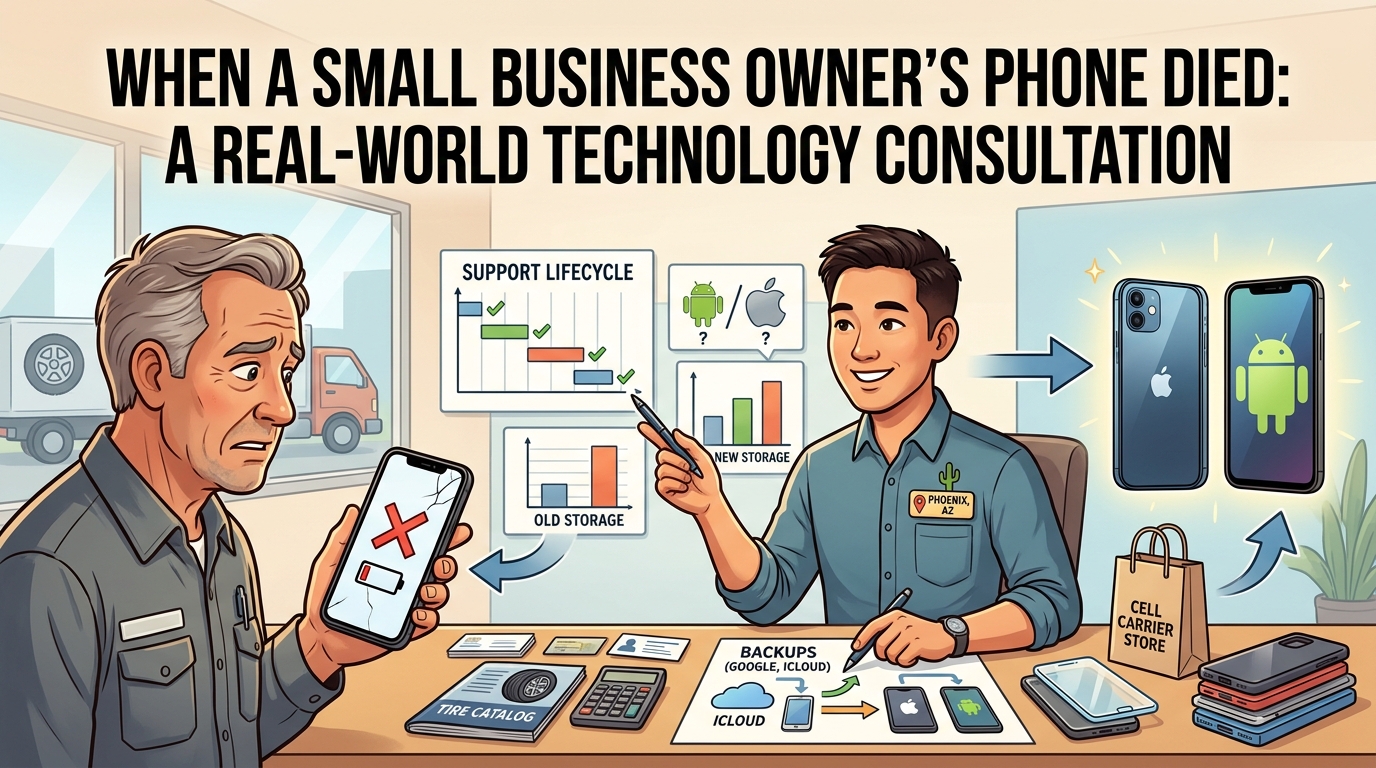
Illustration of a technology consultant helping a small business owner replace a failed smartphone and migrate data to a new device.

One of my longtime clients owns a commercial tire shop. His Android smartphone had been intermittently failing to charge for several months. Eventually, the phone refused to power on altogether.

To be fair, my client got every bit of value out of that device. Technology experiences wear and tear, and this smartphone finally decided it was done. Like a good steak, it was cooked.

The customer called me urgently.

“Duke, will you help us?”

The husband and wife asked me to accompany them to the Verizon store first thing the next morning. We arrived early and had breakfast at the local Chick-fil-A in the same shopping center while waiting for the store to open.

When Verizon opened its doors, we walked in and began the process of selecting replacement phones.

The husband had used Samsung Android phones for years. He asked me whether he should stay with Android or switch to an iPhone.

I explained that staying with Android would allow him to continue using a familiar operating system without having to learn a new interface. However, if he switched to an iPhone, his wife and daughter already used Apple products and could help him whenever he got stuck.

I also explained that there would be a learning curve.

“Apple products are designed for people who just want the device to work. They typically have fewer customization options than Android, but many people appreciate their simplicity.”

One thing I told the husband made him laugh.

“You’ll probably call me less after you switch to the iPhone.”

There was some truth behind the joke. In my experience, Apple tightly controls both the hardware and software, which often results in a simpler, more predictable experience for many users. Android devices generally offer greater flexibility and customization, but that flexibility can sometimes introduce additional complexity.

Neither platform is right or wrong. It depends on the user.

In this case, the customer’s Android phone had already died, creating stress and disrupting business operations. He relied on that phone to communicate with customers, suppliers, and employees. The inconvenience and lost productivity had already reached what I call the angst factor.

The angst factor occurs when the cost of frustration exceeds the cost of the solution.

At that point, the conversation is no longer about saving money. It becomes about restoring productivity and reducing stress.

Next, we discussed whether he should purchase Apple’s newest model or save money by purchasing the previous year’s model.

I explained that every technology product has a support lifecycle attached to it. Manufacturers release operating system updates, security patches, and feature updates for a limited number of years. When a customer buys a device, they enter somewhere within that support lifecycle.

The newer the device, the longer the remaining support window. The tradeoff is that newer devices usually cost more.

The older the device, the lower the cost. However, part of the support lifecycle has already been consumed.

The husband wasn’t the only person upgrading that morning. His wife was still using an older iPhone that did not support 5G and was operating on 4G LTE. She was also running out of storage because she takes a tremendous number of photos and frequently downloads music to her phone.

When recommending smartphones, I generally suggest purchasing at least twice the amount of storage currently being used. Most people don’t take fewer photos, install fewer apps, or save less data over time. Their storage needs tend to grow.

Buying additional storage upfront is usually much less expensive and much less frustrating than running out of space a year or two later and being forced to upgrade sooner than expected.

Planning for tomorrow is just as important as meeting today’s requirements.

As we reviewed their options, it became clear that both devices had reached the point where replacement made sense.

After evaluating promotions, trade-in offers, storage options, and pricing, the customers determined that last year’s iPhone model provided the best value. They saved a considerable amount of money while still receiving many years of software updates, security support, and modern hardware features.

The day before our Verizon visit, I helped the customer contact his current mobile carrier to obtain the account number and port-out PIN required to transfer his number. We arrived at the Verizon store with everything ready to go.

Cell phone sales representatives love it when I walk in with my clients.

The decisions have already been discussed. The necessary information is available. The questions have already been answered. The process becomes faster and easier for both the customer and the salesperson.

The Verizon representative asked whether they wanted accessories such as a case and screen protector. Although they could have purchased those items elsewhere for less money, they chose convenience.

They wanted to get their phones operational, get back to work, and return customer calls.

The customers paid me for my time and consultation.

Because their information had already been backed up through Google and iCloud, the transition was smooth. Their contacts, calendars, email, photos, and other important information were restored to the new devices without issue.

This experience highlights an important lesson for small business owners.

When a critical piece of technology fails, even something as common as a smartphone can disrupt operations. Every hour without communication represents potential lost customers, missed opportunities, and lost revenue.

The real cost is rarely the device itself.

The real cost is the interruption.

Having an experienced, trusted technology consultant available to help guide a stressful situation reduces confusion, eliminates unnecessary delays, and helps businesses make practical decisions under pressure.

Technology failures are stressful enough.

You don’t need to navigate them alone.


About Duke Nguyen

Duke Nguyen is a technology consultant serving Phoenix, Arizona. Duke helps homeowners, retirees, churches, and small business owners make informed technology decisions involving computers, smartphones, cybersecurity, cloud services, backups, websites, Microsoft 365, Google Workspace, and networking.

With an education-first approach, Duke believes technology should simplify life and business, not complicate it. Whether helping a customer recover from a cybersecurity incident, select the right computer, replace a failed smartphone, or migrate data to a new device, Duke focuses on practical solutions that provide long-term value.

Many of Duke’s articles are inspired by real customer experiences and real-world technology challenges. His goal is to help others avoid costly mistakes and make better technology decisions before problems occur.

Need help with computers, smartphones, cybersecurity, cloud services, websites, backups, or small business technology? Contact Duke Nguyen to schedule a consultation.