
When “Cleaning Apps” Turn Into Malware

Technology consultant helping a smartphone user remove malware and unwanted cleaning apps from an Android device.

Two months ago, I walked into the Spectrum Store (formerly Cox) to switch my mobile phone service from another carrier. While I was handling the paperwork, my buddy sat nearby using his Samsung Galaxy Android phone.

Nothing seemed unusual until pop-up messages started taking over the device.

I asked what he had been doing. He told me he had seen notifications recommending phone cleaning apps. Thinking they would help improve performance, he installed them.

Instead, the apps began taking over the phone.

I asked why he hadn’t checked with me first before installing them. I immediately stopped what I was doing and removed the offending apps from the device.

Fortunately, the fix was quick.

After removing the malware and unwanted applications, I installed a trusted maintenance utility that I have used for years and advised him not to install additional cleaning apps without first verifying their legitimacy.

The Growing Problem with Mobile Malware

Misleading pop-ups and fake cleaning apps are becoming increasingly common, particularly on Android devices.

Some display alarming security warnings. Others claim your phone is infected. Some even use audio messages to create a sense of urgency.

The goal is usually the same:

Convince you to install software you do not need.

For seniors, small business owners, and busy professionals, these apps can become more than a nuisance. They can interfere with normal phone operation and create unnecessary stress when communication is important.

The good news is that you often do not need a new phone.

Many mobile malware problems can be removed without replacing the device.

Thorough Support From a Local Technology Consultant

Many technology problems are solved quickly once the root cause is identified. The difficult part is often understanding what happened and knowing how to prevent it from happening again.

At Win Information Technology, we take the time to explain the problem, answer your questions, and recommend practical solutions based on your needs. Our goal is not just to fix the immediate issue, but to help you use your technology with confidence moving forward.

After all, we’re your neighbors.

About Duke Nguyen

Duke Nguyen is a technology consultant serving Phoenix, Arizona. Through Win Information Technology, Duke helps homeowners, retirees, churches, musicians, and small business owners make informed technology decisions involving computers, smartphones, cybersecurity, cloud services, websites, backups, and business continuity.

Duke’s approach is simple:

Technology should make life easier, not more complicated.

Rather than focusing solely on hardware and software, Duke works to understand each client’s goals, explain solutions in plain English, and recommend practical options that fit their needs and budget.

His experience includes:

  • Computer repair and troubleshooting
  • Mobile device support
  • Cybersecurity awareness
  • Professional email and domain setup
  • Website modernization and management
  • Cloud and Microsoft 365 services
  • Backup and disaster recovery planning

Duke believes that the best technology solutions are the ones people actually understand and use confidently.

As a locally owned business serving North Phoenix and surrounding communities, Win Information Technology provides both onsite and remote support tailored to the unique needs of each client.

When a Small Business Owner’s Computer Finally Died

Small business owner recovering from a computer failure while restoring passwords, email access, backups, and Microsoft 365 services after a desktop computer crash.

One of my longtime customers owns a small business. About eight years ago, I helped him purchase and set up a desktop computer. At the same time, I configured an external backup drive so his business files would have some protection if the computer ever failed.

For years, everything worked.

I rarely heard from him.

The computer continued running Windows 10 long after it began showing its age. The system gradually became slower, but it still performed the two tasks his business depended on most: QuickBooks and Outlook.

Like many small business owners, he had more important things to worry about than technology.

Until technology decided it was time to get his attention.

The Warning Nobody Wants to Hear

Two years earlier, we had a conversation about the computer.

I explained that it was getting old and needed to be replaced.

I told him there were really only two choices.

He could spend money on new equipment now.

Or he could spend more money on emergency repairs, recovery work, downtime, and new equipment after the computer failed.

Most aging computers eventually collect their debt.

The only question is when.

The Hidden Problem Nobody Saw Coming

Years earlier, when Cox Business exited the email hosting business, his email was migrated to another provider.

Everything seemed fine.

Until we needed support.

The provider had virtually no meaningful customer service.

There was nobody to call.

Nobody to email.

No knowledgeable technician to escalate an issue to.

Just an inexpensive AI-driven support system that couldn’t answer questions or solve real-world account problems.

That wasn’t a problem until the customer needed access to an account.

Then it became a major problem.

No Power. No Lights. No Business.

One day, the computer finally gave up.

No power.

No lights.

Nobody home.

Without that computer, his business was effectively down.

Fortunately, he immediately went to Costco and purchased a replacement desktop computer.

A few hours later, I arrived to begin setting it up.

That’s when we discovered the real disaster.

The customer didn’t know his passwords.

The Computer Wasn’t the Biggest Problem

People often assume that recovering from a computer failure is about restoring files.

In reality, restoring the files is usually the easy part.

The difficult part is regaining access to everything else.

The customer didn’t know many of the passwords needed to access his accounts.

To make matters worse, many password recovery methods relied on email accounts hosted with the provider he could no longer access.

It became a digital Catch-22.

To reset one account, we needed access to another account.

To access that account, we needed a password that nobody knew.

What was supposed to be a routine computer replacement quickly turned into a digital detective investigation.

Putting Humpty Dumpty Back Together Again

Over the next two days and roughly eight hours of labor, we slowly rebuilt his digital life. As I told the customer’s bookkeeper during the recovery process, we were trying to put Humpty Dumpty back together again. The challenge wasn’t restoring files. The challenge was figuring out how all the pieces fit together.

We:

  • Recovered access to critical accounts.
  • Moved the domain name back to GoDaddy.
  • Migrated email to Microsoft 365.
  • Installed Microsoft Office.
  • Configured OneDrive for Business.
  • Reinstalled software.
  • Reconnected printers.
  • Restored files from backup.

Unfortunately, not everything survived.

Years of historical email were lost during the process.

The backups saved the files.

They did not save everything.

This Could Have Been Much Worse

This customer was fortunate.

We had backups.

We were able to recover the files.

We were able to restore operations.

Within a couple of days, the business was running again.

Many business owners are not that lucky.

I’ve met businesses with:

  • No backups.
  • No password records.
  • No documentation.
  • No technology plan.
  • No local technology consultant.

When their computer fails, there is often no recovery path available.

The Wild Wild West

Many people drive around without a spare tire in their vehicle.

Many business owners operate exactly the same way.

Everything seems fine until something breaks.

Then they discover they were one hardware failure away from disaster.

The worst time to call a technology consultant is after a catastrophic failure.

It’s much less expensive to identify problems before they become emergencies.

An occasional technology review can uncover:

  • Aging hardware.
  • Missing backups.
  • Unsupported software.
  • Password problems.
  • Security risks.
  • Business continuity issues.

You don’t want the first thing a consultant tells you to be:

“I’m sorry. Your files aren’t recoverable.”

For some businesses, that isn’t merely an inconvenience.

It can mean closing the doors permanently.

Do You Feel Lucky?

In the 1971 film Dirty Harry, Clint Eastwood’s character delivered one of the most famous lines in movie history:

“You’ve gotta ask yourself a question: Do I feel lucky?”

Many business owners unknowingly ask themselves the same question every day.

They rely on aging computers.

They don’t know their passwords.

They have no documented recovery plan.

They haven’t tested their backups.

Everything works right up until the moment it doesn’t.

The question is:

Do you feel lucky?


About Duke

Duke Nguyen is a technology consultant serving Phoenix, Arizona. Duke helps homeowners, retirees, churches, and small business owners make informed technology decisions involving computers, cybersecurity, cloud services, Microsoft 365, backups, and business continuity. Through Win Information Technology, Duke provides practical guidance based on real-world customer experiences and over 16 years of professional field IT experience.

Why Some People Get Their Bank Accounts Hacked More Than Once

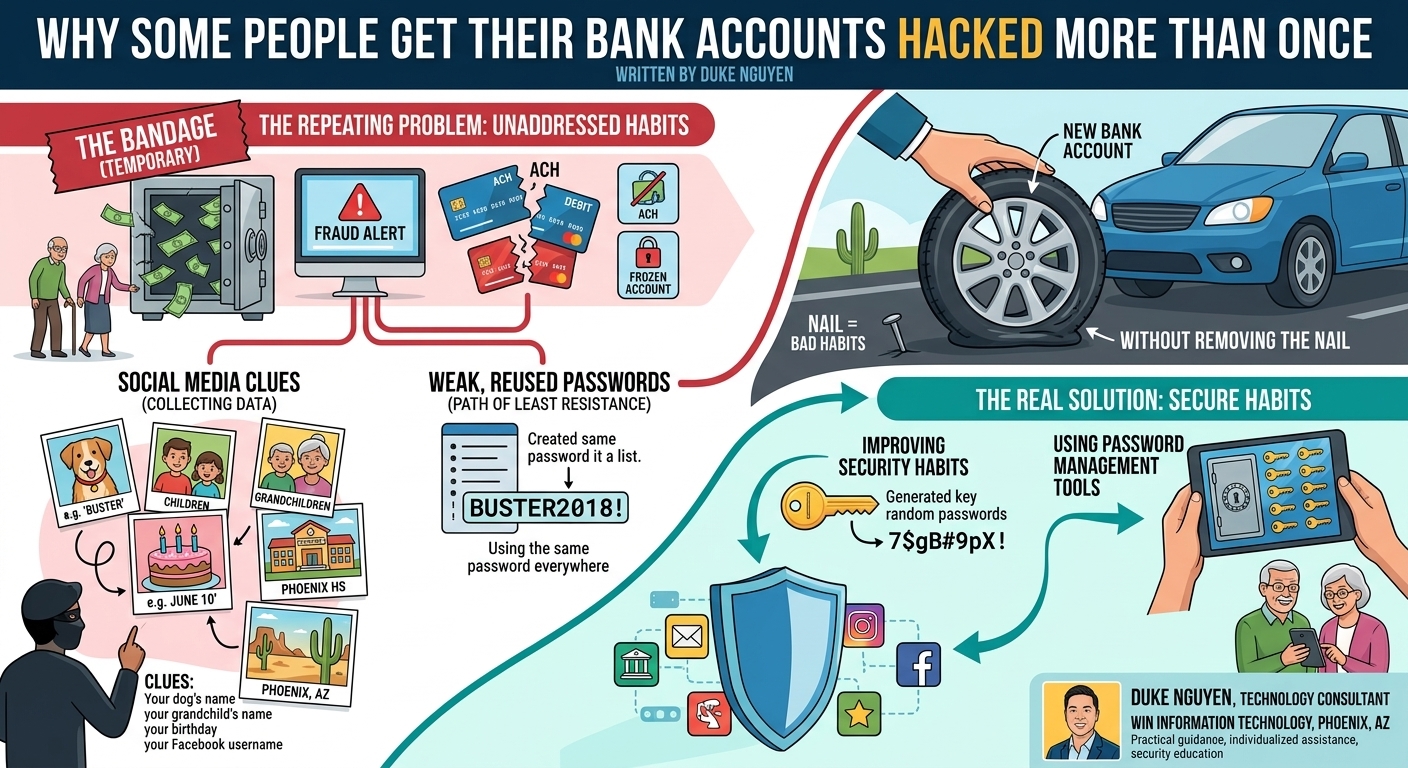
Infographic showing how weak, reused passwords and social media clues can lead to repeated bank account compromises, and how password managers and strong security habits help prevent fraud.

I worked at a customer service call center. Every day, I received calls from customers who needed to replace their checking account information or debit card because their account had been compromised.

Many told me it would take days or weeks for the bank to issue a new debit card or checking account number. During that time, they struggled to pay bills and manage recurring payments.

Most of these customers were seniors who believed in avoiding debt and did not use credit cards. Instead, they relied on ACH payments and debit cards. That worked well until their accounts were compromised.

What surprised me was that many of the same customers experienced the problem more than once.

The new bank account was only a temporary bandage. The real issue was never addressed.

People are creatures of habit. Most choose the path of least resistance when creating passwords.

When asked to create a password, many think:

“What’s a word long enough to meet the requirement?”

So they choose:

  • A pet’s name
  • A child’s name
  • A grandchild’s name
  • The street where they grew up
  • A favorite sports team

Then they add a birth year, graduation year, and an exclamation point.

For years, this seemed harmless.

Then social media arrived.

People began sharing photos of pets, children, grandchildren, vacations, favorite movies, schools attended, birthdays, anniversaries, and family history.

What many people don’t realize is that every public detail creates another clue.

Somewhere in the world, someone may be collecting those clues.

They see:

  • Your dog’s name
  • Your grandchild’s name
  • Your high school
  • Your birthday
  • Your hometown
  • Your Facebook username

If you use the same password across dozens of websites, they don’t need to guess dozens of passwords.

They only need to guess one.

Many people assume:

“It has never happened to me, so it probably won’t.”

Until they wake up to a fraud alert.

Until their bank account is frozen.

Until bills cannot be paid.

Until the bank begins an investigation that may take days or weeks to resolve.

Then a new account is created.

A new debit card is issued.

And life continues.

But if the underlying habits never change, the problem remains.

The bank account was never the weakness.

The password was.

More importantly, the habit was.

Replacing a bank account without improving security habits is like replacing a flat tire without removing the nail from the road.

Sooner or later, the problem returns.


About Duke

Duke Nguyen is a technology consultant serving Phoenix, Arizona. Many of Duke’s articles are based on real-world customer experiences and are designed to help readers avoid costly mistakes through education, practical solutions, and common-sense technology guidance.

Duke helps clients improve their online security by creating unique, randomly generated passwords and using password management tools to securely store them. The goal is simple: stop reusing passwords, reduce risk, and make technology easier to live with.

If you’re concerned about online security, password management, account protection, or securing your digital life, call Duke Nguyen at Win Information Technology for practical guidance and personalized assistance.

How One Click Compromised a Small Business Email Account

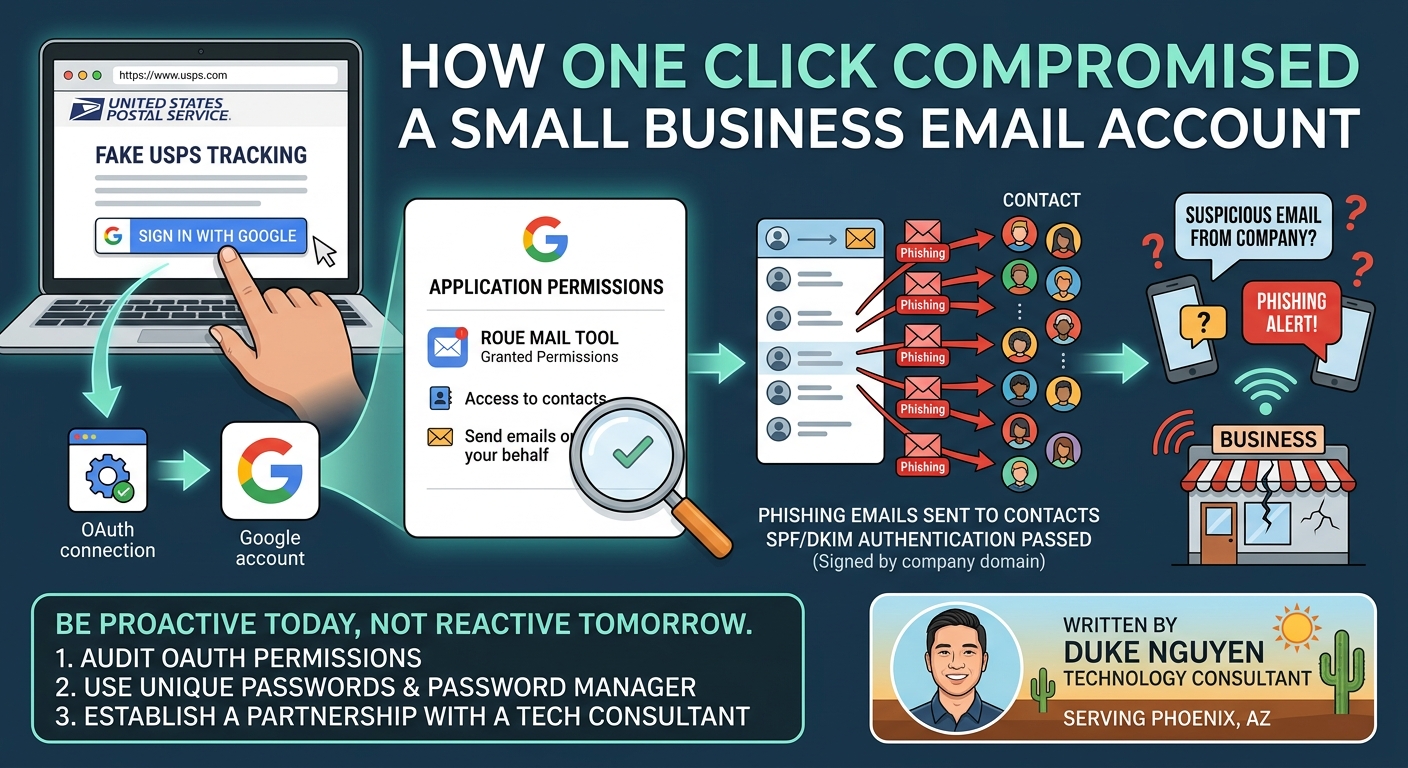
Illustration showing how a malicious OAuth application gained access to a Google account and sent phishing emails from a small business email account.

A few weeks ago, I received an email from a friend and customer who owns a small business. The email contained a link that I could click. When I followed the link, I was taken to a page that looked very similar to Amazon and prompted me to log in. One problem: the website address was not Amazon.

One interesting detail was that the email passed SPF and DKIM authentication checks. In other words, the message was cryptographically signed by my friend’s company domain and appeared legitimate. This suggested that the message originated from inside the organization, as if his email account had been compromised.

I texted my friend, and we connected the following day. He gave me permission to remotely access his computer while we talked over the phone.

Together, we investigated what had happened.

First, I showed him that the links in the email were tied to a legitimate application platform that allows businesses to run third-party apps and services. Then we reviewed his Google account permissions, specifically the OAuth connections that allow websites and applications to sign in using a Google account.

There it was.

At 7:59 AM, an application had been granted access to his Google account and contacts. Just over two hours later, phishing emails had been sent to everyone in his contact list.

Fortunately, many of the emails bounced because the contact list contained numerous outdated addresses. Unfortunately, throughout the day, my friend and his company received phone calls and text messages from people reporting suspicious emails sent from his address.

At first, my friend wondered whether the incident could have been caused by someone seeking revenge against the business. We considered the possibility of an internal issue. However, after reviewing his browsing history, we discovered that he had been searching for doors that morning. One of the websites led to a fake USPS page, and it is possible that either the shipping site or one of the door-distribution websites had been compromised. Most likely, he accidentally clicked a malicious link.

Our solution was straightforward.

We removed all OAuth application permissions from his Google account and disabled the practice of signing into websites with a Google account whenever possible. Going forward, every website should have its own unique username and password stored in a password manager.

This incident highlights why having a competent technology consultant available before an emergency occurs is so important.

When technology problems arise, you do not want to begin searching for a computer repair provider while you are already experiencing a security incident. Doing so increases the risk of accidentally calling a scam company while trying to recover from another scam.

I often compare technology to healthcare.

You visit your primary care physician for annual checkups so that when you become sick, an established relationship already exists. Likewise, routine dental cleanings help prevent costly problems in the future. Technology works the same way.

It is almost always less expensive to prevent problems than to recover from them.

In my friend’s case, the issue was caught quickly and resolved before serious damage occurred. The next incident may not be so forgiving.

Customers are often understanding the first time a business experiences a security issue. However, repeated compromises can damage customer confidence and a company’s reputation.

Cybersecurity is no longer just a technical issue. It is a business issue.

Being proactive today can prevent a much larger problem tomorrow.


About Duke Nguyen

Duke Nguyen is a technology consultant serving Phoenix, Arizona. Duke helps homeowners, retirees, churches, and small business owners with cybersecurity, cloud services, backups, networking, websites, Microsoft 365, Google Workspace, and computer support.

With an education-first approach, Duke believes technology should simplify life and business, not complicate it. Whether helping a customer select the right computer, recover from a phishing attack, or improve security practices, Duke focuses on practical solutions that provide long-term value.

When he’s not helping clients with technology, Duke can often be found walking neighborhoods, meeting local business owners, writing educational technology articles, and building relationships throughout the community.

Need help with cybersecurity, computers, cloud services, backups, websites, or small business technology? Contact Duke Nguyen to schedule a consultation.