
When a Cell Phone Bill Review Saved More Than Money

Technology consultant reviewing cellular phone bills and helping a customer set up a new smartphone.

Several months ago, a buddy of mine complained that his T-Mobile bill seemed too high.

I opened the T-Mobile app and reviewed his account. It didn’t take long to find a few opportunities for savings.

First, I noticed he was still paying for insurance on his Android phone even though the manufacturer’s warranty had already expired.

Next, I discovered he had a tablet plan on the account that he didn’t even remember having.

While he sat next to me, he called T-Mobile, and with his permission, I worked with the loyalty department to review his account. They moved him to the lowest available military plan, removed the unnecessary tablet line and device insurance, and reviewed his available discounts.

I also checked his T-Mobile Home Internet account. Because he bundled his mobile service and home Internet with automatic payments, several discounts were already being applied.

In the end, there wasn’t much additional money left to save because the bundle pricing was already competitive.

A New Phone for Free

While reviewing his account, I found another opportunity.

By trading in his old Android phone, he qualified for a newer Samsung Galaxy device through a promotion that provided monthly bill credits over 24 months, after sales taxes and activation fees.

We ordered the new phone online and visited a T-Mobile corporate store the following day to pick it up.

While we waited, I helped him back up his phone to Google.

When the sales representative handed us the new phone, we sat down and transferred all of the data from his old device. As a local technology consultant, I handled the setup and migration process while the sales representative focused on assisting other customers.

Afterward, we ordered a protective case and screen protector from Amazon and installed them once they arrived.

Understanding Wireless Plans

One of the services I have provided for decades is helping customers review cellular phone and Internet bills.

Many consumers assume they must stay with one of the major carriers. In reality, dozens of prepaid providers operate using the same networks owned by Verizon, T-Mobile, and AT&T.

The major carriers often allow these providers to use their networks, creating lower-cost alternatives for consumers.

As a result, many customers can reduce their monthly bill without sacrificing the coverage they already receive.

Do You Really Need Unlimited Data?

Many customers believe they need an unlimited data plan.

In reality, unlimited talk and text are standard on most plans. The real question is how much data you actually use each month.

Most carriers allow customers to review recent usage through their mobile app, online portal, or device settings. Customers are often surprised to discover that they use far less data than they thought.

A small percentage of users consistently consume large amounts of data and may benefit from a truly unlimited plan.

For everyone else, a lower-cost plan with the right amount of data and a small cushion may be the better choice.

Other Considerations

Choosing the right wireless provider isn’t only about price.

Customers should also consider:

  • Coverage where they live, work, and travel.
  • International roaming requirements.
  • Device compatibility.
  • Family plan needs.
  • Home Internet bundle discounts.

Sometimes the Cheapest Option Isn’t the Best Option

In my buddy’s case, there was very little additional savings available because his bundled services were already competitively priced.

That outcome can surprise customers.

Many people assume a lower bill always means switching providers. Sometimes the best solution is staying with the current provider, removing unnecessary services, applying available discounts, and making sure the customer is on the most appropriate plan.

The goal is not simply to find the cheapest service.

The goal is to find the service that provides the best value for the customer’s needs.

Technology Should Reduce Friction

At Win Information Technology, we help customers evaluate cell phone plans, Internet providers, and mobile devices based on their actual needs.

We assist with:

  • Wireless plan reviews
  • Carrier comparisons
  • Number transfers
  • New phone setup
  • Data migration
  • Internet and cellular provider negotiations
  • Device troubleshooting

We’ve even encountered situations where an adult child in another state is paying for a parent’s phone service but has no access to the physical device. The parent may not know how to retrieve account verification codes or navigate carrier support systems.

In those situations, we can serve as the local hands and feet, working directly with the customer and provider to help resolve the issue.

Technology should reduce friction, not create more of it.

About Duke Nguyen

Duke Nguyen is a technology consultant serving Phoenix, Arizona. Through Win Information Technology, Duke helps homeowners, retirees, churches, musicians, and small business owners make informed technology decisions involving computers, smartphones, cybersecurity, cloud services, websites, backups, and business continuity.

Duke’s approach is simple:

Technology should make life easier, not more complicated.

Rather than focusing solely on hardware and software, Duke works to understand each client’s goals, explain solutions in plain English, and recommend practical options that fit their needs and budget.

His experience includes:

  • Computer repair and troubleshooting
  • Mobile device support
  • Cybersecurity awareness
  • Professional email and domain setup
  • Website modernization and management
  • Cloud and Microsoft 365 services
  • Backup and disaster recovery planning

Duke believes the best technology solutions are the ones people actually understand and use confidently.

As a locally owned business serving North Phoenix and surrounding communities, Win Information Technology provides both onsite and remote support tailored to the unique needs of each client.

A Website Is Rarely Beyond Repair

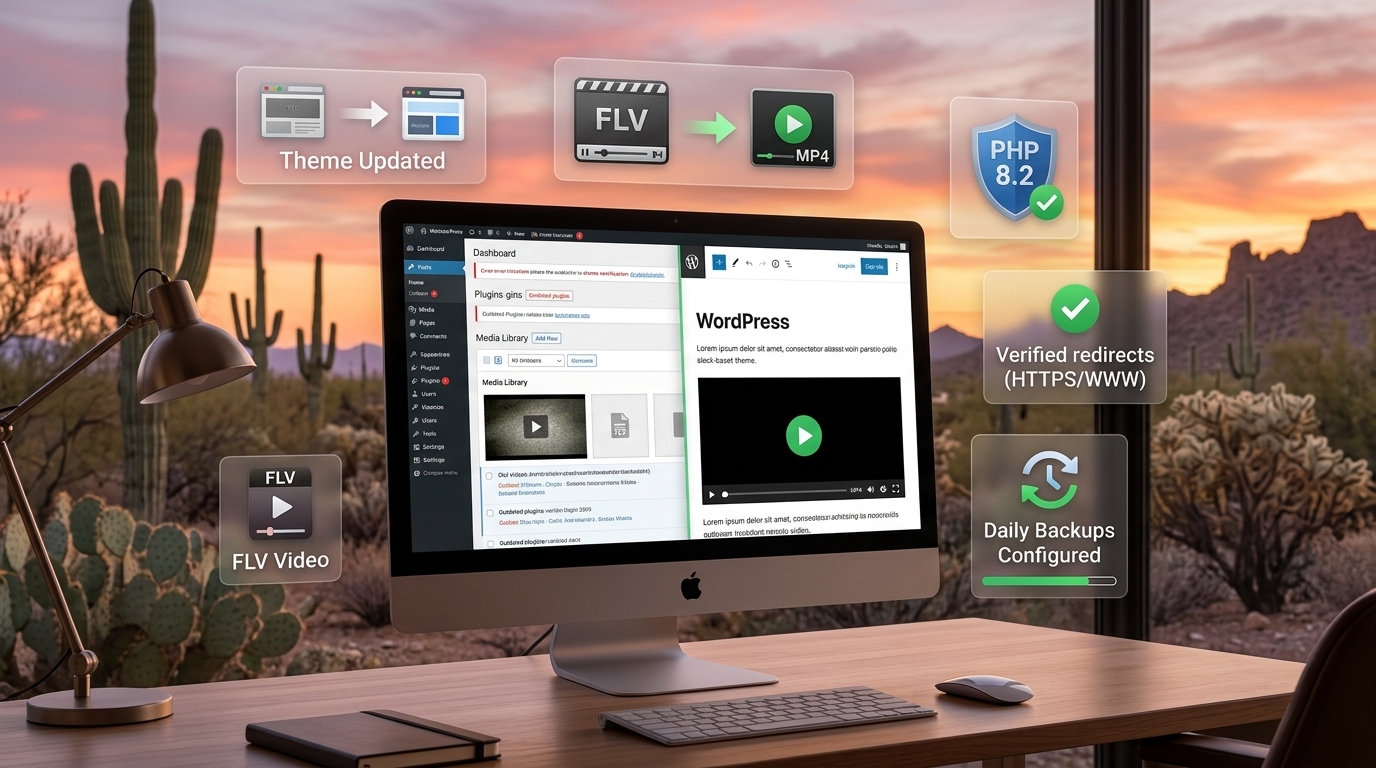
Restored WordPress website showing PHP upgrades, MP4 video conversions, redirects, and backup improvements.

A friend of mine, who is also a client, has operated a WordPress website since 2009.

He originally hired a web designer to build the site. Over the years, he managed the content himself and worked with a team of volunteer writers. Like many long-term projects, life and business eventually became priorities, and the website received less attention.

As the years passed, WordPress continued to evolve. Themes became outdated. Plugins were abandoned. PHP versions changed. What had once been a functioning website slowly became difficult to maintain.

The website wasn’t completely forgotten. Visitors from around the world still read articles and left comments, but the technical foundation underneath was aging and becoming increasingly fragile.

Several months ago, while helping my friend with other technology-related projects, I mentioned the website. He told me he hoped to revive it someday.

Today, I found myself with a little free time and decided to take a closer look.

Bringing an Old Website Back to Life

After logging into the WordPress administration interface, I began working through the site one issue at a time.

I replaced an outdated theme with a modern, supported theme. I removed empty pages and cleaned up the site’s navigation menu. I removed unnecessary plugins and reduced the amount of technical debt that had accumulated over the years.

The website still contained older FLV video files, a format that many modern web browsers no longer support. I converted the videos to MP4 format and updated the pages so visitors could continue viewing the content without requiring obsolete software.

I added a site icon, updated the footer, enabled automatic updates, and configured daily backups.

I also upgraded the website’s PHP version to the latest supported release, improving security, compatibility, and long-term maintainability.

Finally, I verified that:

  • HTTP redirects to HTTPS
  • WWW redirects to the root domain
  • Mobile devices display the website correctly
  • Videos play properly
  • Backups complete successfully

What began as a neglected website was now running smoothly again.

The Value of a Platform Like WordPress

When people encounter an aging website, many assume it must be redesigned from the ground up.

Sometimes that is true.

Often, however, the website itself isn’t the problem.

The real issue is years of accumulated technical debt:

  • Outdated plugins
  • Unsupported themes
  • Legacy media formats
  • Old PHP versions
  • Missing backups
  • Neglected maintenance

One of the advantages of using a platform like WordPress is that many of these problems can be corrected without rebuilding the entire website.

A business owner, web developer, web designer, or technology consultant can often modernize an existing website and extend its useful life for years.

Don’t Give Up on Your Old Website

This particular website had been struggling for years. At one point, I thought it might be beyond repair.

Fortunately, it wasn’t.

With some patience, cleanup, testing, and modernization, the website is now stable, secure, and significantly easier to maintain.

If you have an older WordPress website that needs some attention, I’d be happy to help. I can assist with updates, maintenance, backups, migrations, security improvements, and content publishing so your website can continue serving your audience for years to come.


About Duke Nguyen

Duke Nguyen is the founder of Win Information Technology in Phoenix, Arizona. As a Technology Consultant, he helps businesses, nonprofits, churches, and homeowners solve technology pain points involving computers, Microsoft 365, networking, email, domains, websites, cloud services, and cybersecurity.

His philosophy is simple:

Technology should simplify life and business, not complicate it.

For more information, visit Win Information Technology or call 480-359-4201.

Launch First, Perfect Later: Why Functional Websites Beat “Coming Soon” Pages

Comparison of a Coming Soon website versus a live business website generating customer opportunities.

Imagine two companies.

Company A

  • Domain Name Registered On: August 14, 2026
  • Updated On: August 19, 2026

A traditional web designer started work on August 19. As of October 21, the website still displays a “Coming Soon” page.

Company B: The Right Scepter Band

  • Domain Name Registered On: September 29, 2026
  • Updated On: October 4, 2026

Email address and website work began almost immediately on October 4. By October 20, the Right Scepter Band website was live. The domain, email, and website security were hardened on the backend.

Visit the website: Right Scepter Band

Was it perfect? No.

Was it functional? Absolutely.

Visitors can now learn about the band, read about its members, and access booking information. If the band talks with prospective venues or event organizers, they have a website to share. New content, photos, videos, and improvements can be added over time.

Think of it like a new home.

The exterior may not be painted yet. The landscaping may still be dirt. But the lights work, the plumbing works, and the homeowners can move in today.

Solving the Real Business Problem

At Win Information Technology, we do not claim to be award-winning web designers.

We’re IT professionals.

Our focus is reducing technical debt and removing obstacles so business owners can move forward with their businesses and their lives.

The real problem isn’t usually:

“My website isn’t beautiful enough.”

The real problem is often:

“Customers ask if we have a website, and we don’t.”

A beautiful website that never launches generates no awareness and no revenue.

A functional website that launches today can generate awareness, leads, and opportunities immediately.

The same principle applies to business cards. Beautiful business cards sitting in a drawer don’t generate customers. Business cards handed to potential customers do.

Ownership Matters

One concern I have seen repeatedly throughout my IT career is that many business owners don’t actually own their online presence.

Sometimes a web designer or developer registers the domain name, controls the hosting account, manages the email system, and becomes the sole gatekeeper.

Everything works well until something happens.

The web designer:

  • Changes careers
  • Becomes too busy
  • Stops responding
  • Forgets to renew hosting
  • Becomes sick
  • Retires
  • Moves away

Or simply disappears.

When that happens, the business owner may lose access to critical systems and be forced to rebuild everything from scratch.

My Advice to Business Owners

Always own:

  • Your domain name
  • Your email accounts
  • Your website hosting

You can grant access to your IT consultant, web developer, or marketing company, but they should not have exclusive control.

Technology vendors come and go. Businesses need continuity.

Nobody plans for emergencies, but every business owner should plan for continuity. If a contractor becomes unavailable tomorrow, your business should still be able to access its website, email, and domain registration.

Ownership isn’t about distrust.

It’s about resilience.

Launch the website. Own the assets. Improve things over time.

Perfect can wait.


About Duke Nguyen

Duke Nguyen is the founder of Win Information Technology in Phoenix, Arizona. He helps small businesses, homeowners, churches, and nonprofit organizations simplify technology by providing practical solutions for computers, Microsoft 365, networking, email, domains, website hosting, and cybersecurity. His philosophy is simple: solve the business problem first, then improve and optimize over time.

For more information, visit Win Information Technology or call 480-359-4201.

When a Small Business Owner’s Computer Finally Died

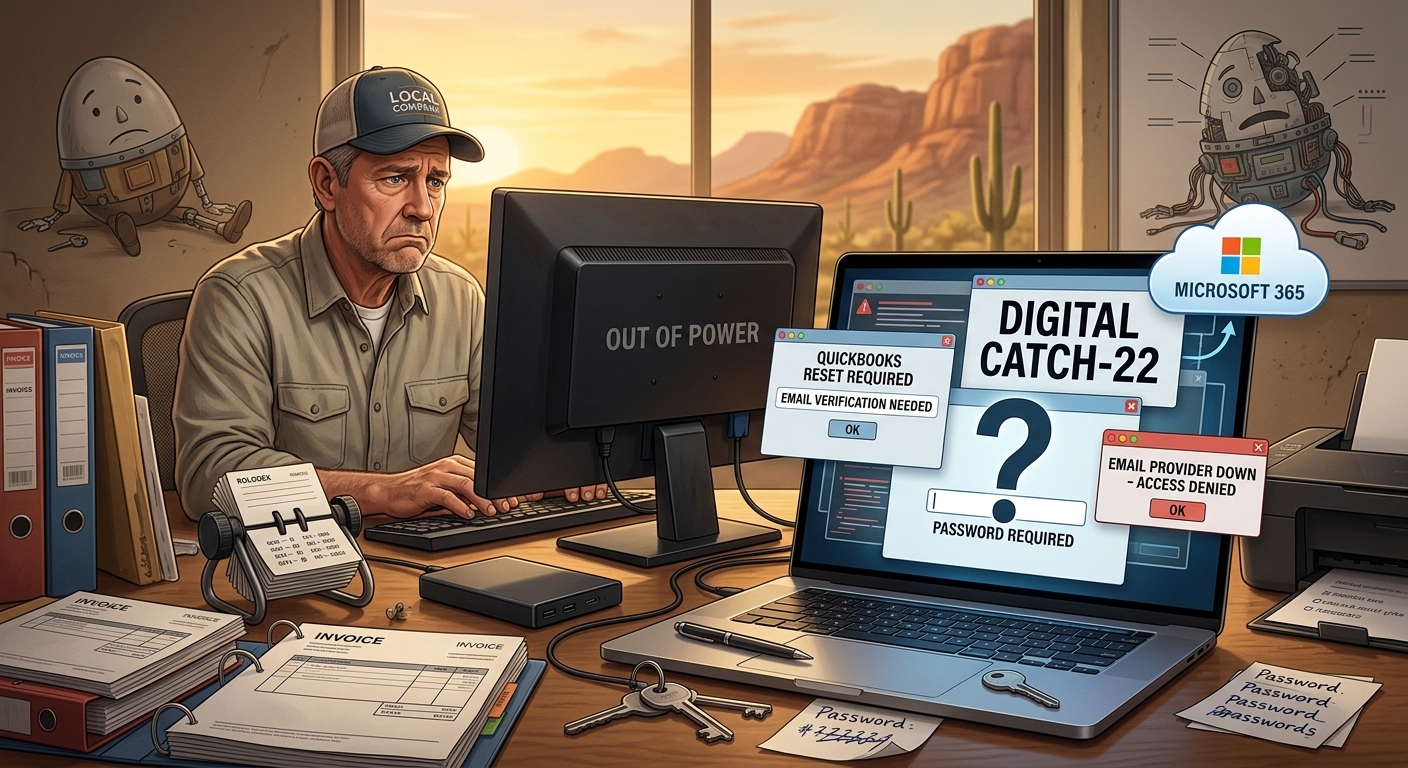
Small business owner recovering from a computer failure while restoring passwords, email access, backups, and Microsoft 365 services after a desktop computer crash.

One of my longtime customers owns a small business. About eight years ago, I helped him purchase and set up a desktop computer. At the same time, I configured an external backup drive so his business files would have some protection if the computer ever failed.

For years, everything worked.

I rarely heard from him.

The computer continued running Windows 10 long after it began showing its age. The system gradually became slower, but it still performed the two tasks his business depended on most: QuickBooks and Outlook.

Like many small business owners, he had more important things to worry about than technology.

Until technology decided it was time to get his attention.

The Warning Nobody Wants to Hear

Two years earlier, we had a conversation about the computer.

I explained that it was getting old and needed to be replaced.

I told him there were really only two choices.

He could spend money on new equipment now.

Or he could spend more money on emergency repairs, recovery work, downtime, and new equipment after the computer failed.

Most aging computers eventually collect their debt.

The only question is when.

The Hidden Problem Nobody Saw Coming

Years earlier, when Cox Business exited the email hosting business, his email was migrated to another provider.

Everything seemed fine.

Until we needed support.

The provider had virtually no meaningful customer service.

There was nobody to call.

Nobody to email.

No knowledgeable technician to escalate an issue to.

Just an inexpensive AI-driven support system that couldn’t answer questions or solve real-world account problems.

That wasn’t a problem until the customer needed access to an account.

Then it became a major problem.

No Power. No Lights. No Business.

One day, the computer finally gave up.

No power.

No lights.

Nobody home.

Without that computer, his business was effectively down.

Fortunately, he immediately went to Costco and purchased a replacement desktop computer.

A few hours later, I arrived to begin setting it up.

That’s when we discovered the real disaster.

The customer didn’t know his passwords.

The Computer Wasn’t the Biggest Problem

People often assume that recovering from a computer failure is about restoring files.

In reality, restoring the files is usually the easy part.

The difficult part is regaining access to everything else.

The customer didn’t know many of the passwords needed to access his accounts.

To make matters worse, many password recovery methods relied on email accounts hosted with the provider he could no longer access.

It became a digital Catch-22.

To reset one account, we needed access to another account.

To access that account, we needed a password that nobody knew.

What was supposed to be a routine computer replacement quickly turned into a digital detective investigation.

Putting Humpty Dumpty Back Together Again

Over the next two days and roughly eight hours of labor, we slowly rebuilt his digital life. As I told the customer’s bookkeeper during the recovery process, we were trying to put Humpty Dumpty back together again. The challenge wasn’t restoring files. The challenge was figuring out how all the pieces fit together.

We:

  • Recovered access to critical accounts.
  • Moved the domain name back to GoDaddy.
  • Migrated email to Microsoft 365.
  • Installed Microsoft Office.
  • Configured OneDrive for Business.
  • Reinstalled software.
  • Reconnected printers.
  • Restored files from backup.

Unfortunately, not everything survived.

Years of historical email were lost during the process.

The backups saved the files.

They did not save everything.

This Could Have Been Much Worse

This customer was fortunate.

We had backups.

We were able to recover the files.

We were able to restore operations.

Within a couple of days, the business was running again.

Many business owners are not that lucky.

I’ve met businesses with:

  • No backups.
  • No password records.
  • No documentation.
  • No technology plan.
  • No local technology consultant.

When their computer fails, there is often no recovery path available.

The Wild Wild West

Many people drive around without a spare tire in their vehicle.

Many business owners operate exactly the same way.

Everything seems fine until something breaks.

Then they discover they were one hardware failure away from disaster.

The worst time to call a technology consultant is after a catastrophic failure.

It’s much less expensive to identify problems before they become emergencies.

An occasional technology review can uncover:

  • Aging hardware.
  • Missing backups.
  • Unsupported software.
  • Password problems.
  • Security risks.
  • Business continuity issues.

You don’t want the first thing a consultant tells you to be:

“I’m sorry. Your files aren’t recoverable.”

For some businesses, that isn’t merely an inconvenience.

It can mean closing the doors permanently.

Do You Feel Lucky?

In the 1971 film Dirty Harry, Clint Eastwood’s character delivered one of the most famous lines in movie history:

“You’ve gotta ask yourself a question: Do I feel lucky?”

Many business owners unknowingly ask themselves the same question every day.

They rely on aging computers.

They don’t know their passwords.

They have no documented recovery plan.

They haven’t tested their backups.

Everything works right up until the moment it doesn’t.

The question is:

Do you feel lucky?


About Duke

Duke Nguyen is a technology consultant serving Phoenix, Arizona. Duke helps homeowners, retirees, churches, and small business owners make informed technology decisions involving computers, cybersecurity, cloud services, Microsoft 365, backups, and business continuity. Through Win Information Technology, Duke provides practical guidance based on real-world customer experiences and over 16 years of professional field IT experience.

Why Buying the Fastest Internet Plan Isn’t Always the Best Decision

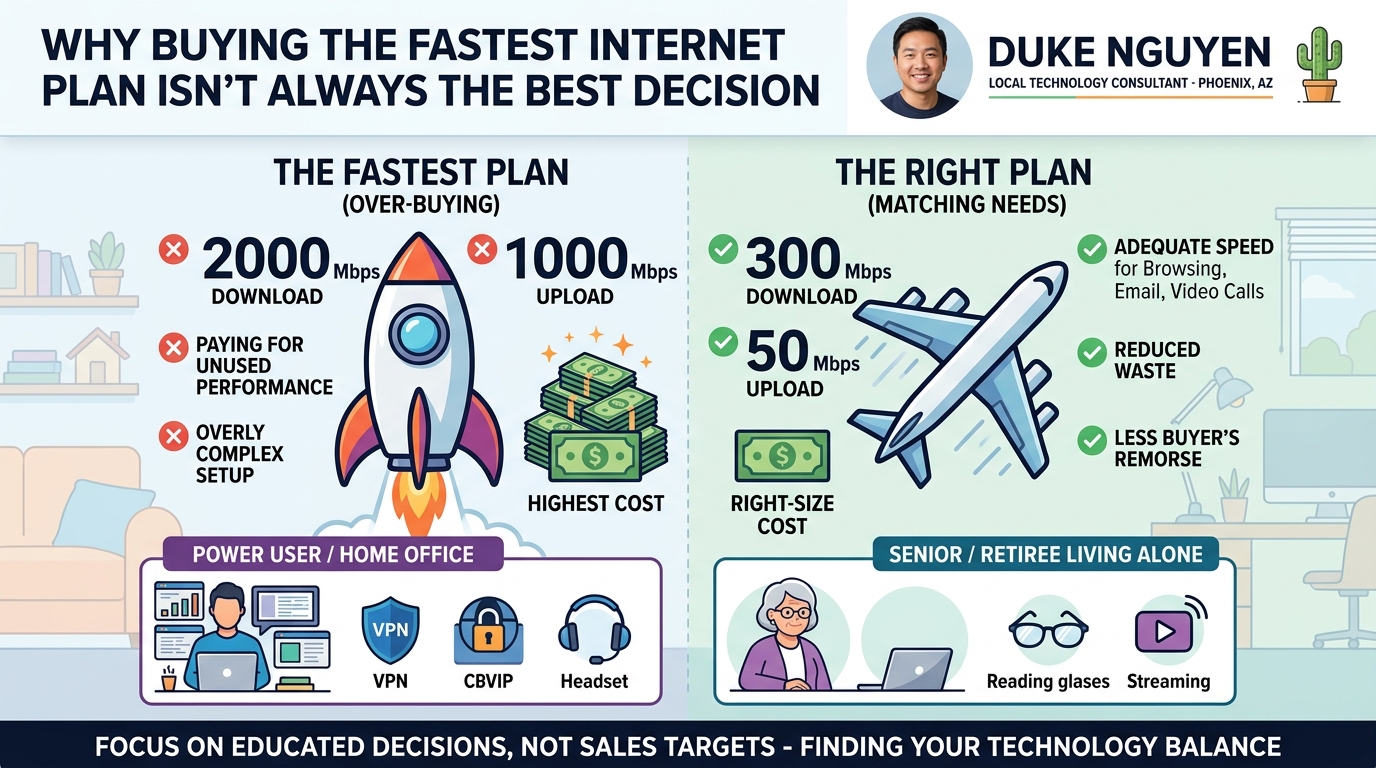
Infographic comparing an expensive high-speed internet plan with a right-sized internet plan based on a customer's actual needs, usage, and budget.

One morning, my next-door neighbor asked if I would drive her to the local Verizon store and accompany her inside.

She already had Verizon cell phone service but wanted to sign up for home internet service.

When we arrived, she asked me to listen as she spoke with the salesperson and help her evaluate the options.

Verizon Home Internet offered three service tiers. Almost immediately, the salesperson began encouraging her to purchase one of the higher-priced plans.

I asked a simple question:

“What are the download and upload speeds for each tier?”

The salesperson quickly responded with the download speeds, but when I asked about the upload speeds, the conversation changed.

“Um… uh… let me check.”

Many salespeople and consumers focus exclusively on download speeds and assume upload speeds are similar. In reality, upload speeds matter, especially for people who work from home and connect to their employer’s network through a Virtual Private Network (VPN). Video conferencing, cloud backups, file sharing, and remote access all depend on upload performance.

The salesperson continued encouraging my neighbor to purchase one of the more expensive service tiers. He claimed that customers who selected the basic tier often experienced degraded performance and insufficient speeds.

I disagreed.

“That’s not necessarily true. You don’t know where we live, how many devices we have, or how the service performs in our neighborhood.”

I also explained that it is often easier and less expensive to start with a lower-tier plan and upgrade later if necessary than it is to start with the highest-tier plan and discover you’re paying for performance you don’t need.

At that point, the salesperson shifted from selling to listening.

To be fair, this story is not about Verizon, and it is not about criticizing salespeople.

It is about helping customers make informed decisions.

Every business has sales goals. Every salesperson has quotas. There is nothing inherently wrong with that.

The problem occurs when recommendations are based on sales targets rather than actual customer needs.

My neighbor lives alone.

She doesn’t play online games.

She doesn’t stream multiple televisions simultaneously.

She doesn’t run a business from home.

She simply needed reliable internet service for everyday activities such as browsing the web, checking email, watching videos, and communicating with family and friends.

The basic tier met those requirements perfectly.

One thing I have learned over the years is that customers appreciate honesty.

When people feel that someone is educating them rather than selling to them, they become more confident in their decisions. They are less likely to experience buyer’s remorse and more likely to trust future recommendations.

Technology consultations aren’t really about technology.

They’re about helping people make decisions.

Customers don’t hire me because I know what internet plans exist.

They hire me because they don’t want to navigate technology decisions alone.

Whether it’s choosing a computer, replacing a smartphone, selecting an internet provider, or evaluating cybersecurity risks, my role is to help customers understand their options and avoid spending money unnecessarily.

The most expensive solution is not always the best solution.

The right solution is the one that meets the customer’s needs.


About Duke Nguyen

Duke Nguyen is a technology consultant serving Phoenix, Arizona. Duke helps homeowners, retirees, churches, and small business owners make informed technology decisions involving computers, smartphones, networking, cloud services, backups, websites, Microsoft 365, Google Workspace, and cybersecurity.

With an education-first approach, Duke believes technology should simplify life and business, not complicate it. Whether helping a customer compare internet plans, select a computer, replace a failed smartphone, or recover from a cybersecurity incident, Duke focuses on helping people make practical decisions that provide long-term value.

Many of Duke’s articles are inspired by real customer experiences and real-world technology challenges. His goal is to help others avoid costly mistakes and make better technology decisions before problems occur.

Need help with computers, networking, cloud services, smartphones, cybersecurity, backups, or small business technology? Contact Duke Nguyen to schedule a consultation.